
PCManFM: A Complete Guide to PCManFM File Manager
File managers are an essential part of every operating system, allowing users to organize files, browse directories, and manage storage efficiently. Among lightweight Linux file managers, pcmanfm is one of the most popular choices. Designed for speed and simplicity, PCManFM offers a clean interface while providing the features most users need for everyday file management.
Whether you’re a Linux beginner or an experienced user, understanding PCManFM can help you work more efficiently.
What Is PCManFM?
PCManFM (PCMan File Manager) is a free, open-source file manager primarily associated with the LXDE desktop environment, though it can also be used independently with other Linux desktop environments. It provides a fast and responsive interface for browsing files, managing folders, and performing common file operations.
Its lightweight design makes it especially suitable for older hardware and systems with limited resources.
Why PCManFM Is Popular
Several features contribute to the popularity of PCManFM.
Lightweight Performance
PCManFM uses minimal system resources, making it ideal for low-powered computers.
Easy-to-Use Interface
Its straightforward layout allows users to navigate files quickly without unnecessary complexity.
Fast File Browsing
The application is optimized for responsive directory navigation and file management.
Open-Source Software
PCManFM is freely available, and its source code is maintained by the open-source community.
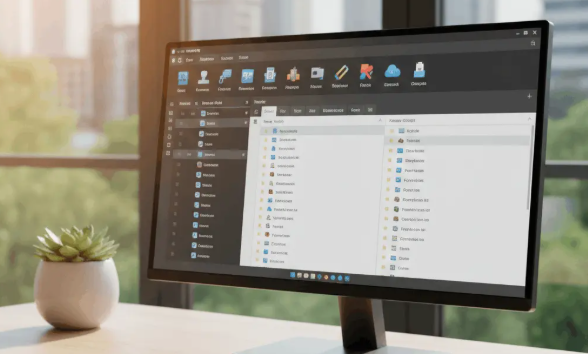
Key Features of PCManFM
PCManFM includes a variety of useful capabilities.
Tabbed Browsing
Open multiple folders in separate tabs for easier navigation.
Drag-and-Drop Support
Move and copy files quickly using simple drag-and-drop actions.
Customizable Interface
Adjust display preferences, icon sizes, and view modes to match your workflow.
Network File Access
Access remote locations through supported protocols and integrated tools.
Benefits of Using PCManFM
Choosing PCManFM provides several advantages.
Efficient File Management
Organize documents, images, videos, and other files with ease.
Low Resource Usage
Ideal for lightweight Linux distributions and older computers.
Flexible Integration
Works well with multiple Linux desktop environments.
Stable Performance
Its mature design provides reliable day-to-day operation.
Common Uses for PCManFM
PCManFM supports many everyday computing tasks.
Managing Personal Files
Browse, copy, move, rename, and delete files efficiently.
Organizing Projects
Create structured folders for work, school, or personal projects.
External Storage Management
Access USB drives, external hard disks, and memory cards.
System Administration
Navigate directories and manage files used by Linux applications.
Best Practices When Using PCManFM
Keep Software Updated
Install updates from your Linux distribution to receive bug fixes and improvements.
Organize Folders
Use meaningful folder names to make files easier to locate.
Back Up Important Data
Maintain regular backups before making significant file changes.
Learn Keyboard Shortcuts
Using shortcuts can improve productivity and speed up file management.
Frequently Asked Questions
What is PCManFM?
PCManFM is a lightweight, open-source file manager commonly used on Linux systems.
Is PCManFM free?
Yes. PCManFM is free and open-source software.
Which desktop environment uses PCManFM?
PCManFM is closely associated with the LXDE desktop environment but can also run on many other Linux desktops.
Can PCManFM manage external drives?
Yes. It supports USB drives, external storage devices, and other mounted file systems.
Is PCManFM suitable for older computers?
Yes. Its lightweight design makes it an excellent choice for systems with limited hardware resources.
Why is PCManFM included throughout the article?
Using pcmanfm naturally throughout the content improves SEO while providing readers with accurate and helpful information about the file manager.
Conclusion
PCManFM remains one of the most efficient and lightweight file managers available for Linux users. With its simple interface, fast performance, tabbed browsing, and open-source development, it offers an excellent balance between usability and efficiency. Whether you’re managing everyday files or working on a lightweight Linux system, PCManFM provides a dependable solution for organizing and accessing your data.